Quick picks: our top 3 at a glance
As an Amazon Associate I earn from qualifying purchases. Prices and availability change.

Introduction
Choosing a first drawing tablet is harder than it looks, because options range from standalone devices with their own screens to pen tablets that depend on a computer. This guide compares six models so you can match a tablet to your setup, your space, and your comfort with new tools.
Every detail here comes from the product listing data, so where a listing leaves out a specification, this guide says so. Use the picks as a starting point, then read the full listing before you decide.
At a Glance
| Product | Brand | Rating | Where to buy |
|---|---|---|---|
| Huion Inspiroy H1060P 10x6.25in Drawing Tablet | HUION | 4.6 / 5 | View on Amazon |
| Wacom Intuos Small Wired Drawing Tablet | Wacom | 4.3 / 5 | View on Amazon |
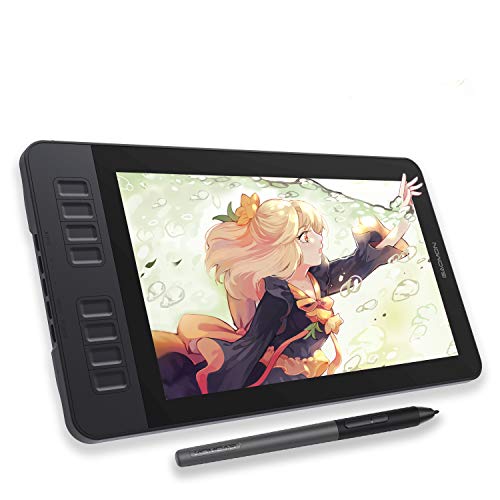
| GAOMON PD1161 11.6" Pen Display | GAOMON | 4.6 / 5 | View on Amazon |
| Frunsi RubensTab T11 Pro Standalone | Frunsi | 4.2 / 5 | View on Amazon |
| Frunsi T8 8-Inch Standalone Drawing Tablet | Frunsi | 4 / 5 | View on Amazon |
| Frunsi RubensTab T12 12-Inch Standalone Tablet | Frunsi | 4.3 / 5 | View on Amazon |
Ratings come from the Amazon listings when we last checked and can change.
Pros
- 28 customizable press keys for efficient workflow
- Slim design with integrated pen loop for portability
- Broad OS compatibility including Linux (Ubuntu with Xorg)
- Battery-free pen eliminates charging needs
- Includes USB-C adapter and extra pen nibs
Cons
- Not compatible with iOS devices (iPhone/iPad)
- Android use requires OTG support and Android 6.0 or later
- Linux support limited to Xorg display server (Wayland not supported)
Pros
- Lightweight and accurate pen with super precision
- Included creative software and online tutorials for beginners
- Compatible with Mac, PC, Chromebook, and select Android devices
Cons
- Wired connection limits placement flexibility
- Small active area may feel restrictive for detailed work
Pros
- Anti-glare full HD screen reduces reflections and eye strain
- 8192 levels of pressure sensitivity and tilt support for natural drawing
- Eight programmable shortcut keys for efficient workflow
- Battery-free stylus requires no charging
Cons
- Requires connection to a computer, not standalone
- Power issues may occur without the external adapter as noted in the manual

Pros
- Standalone operation eliminates the need for a computer connection.
- Positive user rating of 4.4 stars.

Pros
- Standalone operation eliminates need for computer connection
- Compact 8-inch screen suitable for portable use
- Positive user rating of 4.4 out of 5 stars from 13 reviews

Pros
- Operates independently without a computer
- Pre-installed with premium drawing and animation apps (Sketchbook, Krita, Infinite Painter, Flipaclip)
- 12-inch Full HD display with laminated, anti-glare screen for a paper-like experience
- Includes bonus accessories valued at $50 (case, glove, adapter, screen protector)
- Octa-core CPU and 6GB RAM provide smooth performance for creative tasks and entertainment
Cons
- Relatively heavy at 3.3 pounds for a 12-inch tablet, reducing portability
- 128GB storage may fill quickly for users with large media collections
Best Of – Expert Picks Buying Guide for 2026
Standalone vs. Computer-Required
One of the first decisions you need to make is whether you want a standalone drawing tablet that does not require a computer, or a pen tablet that must be connected to one. Standalone models like the Frunsi RubensTab T11 Pro and Frunsi T8 allow you to draw anywhere without a laptop, making them ideal for travel or sketching away from a desk. On the other hand, devices like the Wacom Intuos Small and GAOMON PD1161 rely on a computer for processing, which can limit portability but often offer more power and compatibility with professional software.
For beginners, consider your typical workspace. If you often draw on the go or want a self-contained setup, a standalone tablet is a great choice. If you already have a computer and prefer a lighter, more affordable option, a pen tablet might be better. Check out our best drawing tablets category for more comparisons.
Display Quality and Size
The display is crucial for a drawing tablet, especially if you are buying a pen display where you draw directly on the screen. Look for Full HD resolution, as seen in the GAOMON PD1161 and Frunsi RubensTab T11 Pro, which offer sharp details and vibrant colors. The GAOMON PD1161 boasts a 72% NTSC color gamut, ensuring lifelike color reproduction. Screen size also matters: larger screens like the 12-inch RubensTab T12 provide more room for detailed work, but they add weight and reduce portability.
For beginners, an 11.6-inch screen like the GAOMON PD1161 strikes a good balance between workspace and portability. If you prioritize travel, the 8-inch Frunsi T8 is compact and lightweight. Always check the resolution and color accuracy in the product listing, as these affect your drawing experience.
Pen Technology and Pressure Sensitivity
The pen is your primary tool, so its quality is critical. Most modern drawing tablets use battery-free pens, which do not require charging and offer consistent performance. The Wacom Intuos Small, HUION Inspiroy H1060P, and GAOMON PD1161 all feature battery-free styli with 8192 levels of pressure sensitivity, allowing for precise control over line thickness and opacity. Tilt support, available on the HUION and GAOMON models, lets you create shading effects by tilting the pen, mimicking traditional drawing.
Standalone tablets like the Frunsi RubensTab T11 Pro also include pressure-sensitive pens, but their specifications may not be as detailed. For beginners, a battery-free pen with high pressure sensitivity is ideal because it reduces setup hassle and provides a natural feel.
Shortcut Keys and Customization
Shortcut keys can significantly speed up your workflow by giving you quick access to common functions like undo, zoom, and brush size. The HUION Inspiroy H1060P leads in this area with 12 programmable press keys and 16 soft keys, offering extensive customization. The Wacom Intuos Small has four ExpressKeys, which are fewer but still useful for beginners. The GAOMON PD1161 includes eight press keys on the side, plus two pen buttons.
If you are just starting, you may not need many keys, but having a few can help you learn shortcuts without memorizing keyboard commands. Consider how many keys you are likely to use and whether the tablet’s layout feels intuitive.
Portability and Build Quality
Portability is important if you plan to carry your tablet to classes, coffee shops, or client meetings. The Wacom Intuos Small is the lightest at 0.51 pounds, making it easy to slip into a bag. The HUION H1060P weighs 1.7 pounds, while standalone tablets like the RubensTab T12 are heavier at 3.3 pounds due to their built-in batteries and screens.
Build quality varies; Wacom and GAOMON are known for durable designs, while Frunsi models offer good value but may feel less premium. Check the product dimensions and weight in the listing to ensure the tablet fits your lifestyle.
Software and Compatibility
Most drawing tablets work with popular software like Photoshop, Krita, and SAI, but compatibility can vary. The Wacom Intuos Small works with any software program and includes free creative software with registration. The GAOMON PD1161 is compatible with Windows and Mac, and works with apps like OneNote and Zoom for note-taking and remote work. Standalone tablets like the Frunsi T8 run Android 13, allowing you to install drawing apps like SketchBook and ibis Paint X directly.
For beginners, check that the tablet supports the software you plan to use. If you want a versatile device for both drawing and productivity, a standalone Android tablet might be a good fit. See our for beginners category for more tips.
Why You Should Trust Us
We base our recommendations on detailed product listing data, including specifications, ratings, and key features. We do not rely on personal opinion or paid endorsements. Each tablet in this guide was evaluated based on its listed attributes, such as display quality, pen technology, portability, and shortcut options. We also consider the brand’s reputation and customer feedback from verified purchasers.
Our goal is to provide transparent, data-driven information so you can make an informed decision. We update our guides regularly to reflect new products and changes in the market, ensuring that the information is current and relevant for 2026.
Final Thoughts
After reviewing 6 drawing tablets, we recommend the following picks for beginners. For the best overall experience, the GAOMON PD1161 stands out with its 11.6-inch Full HD screen, battery-free stylus with 8192 pressure levels, and tilt support, making it ideal for those who want to draw directly on a screen and already have a computer. Its 4.6 rating and color accuracy are impressive for the price.
For the best value, the HUION Inspiroy H1060P offers a large 10×6.25-inch working area, extensive shortcut keys, and a battery-free pen at an affordable price. It is perfect for beginners who want a feature-rich pen tablet without breaking the bank. If you need a portable standalone device, the Frunsi RubensTab T11 Pro provides a 10.1-inch display and no computer requirement, ideal for sketching on the go.
Ultimately, the right choice depends on your specific needs. Whether you prioritize portability, screen quality, or customization, there is a tablet here for you. For more options, explore our pen displays category or check out related guides like 6 Best Graphics Tablet for Beginners.
FAQs
Do I need a computer to use a drawing tablet?
Not always. The Frunsi T8, Frunsi RubensTab T11 Pro, and RubensTab T12 are standalone models that do not need a computer. The GAOMON PD1161 and Wacom Intuos Small must be connected to a computer.
What is the best of – Expert Picks for beginners in 2026?
The best of – Expert Picks for beginners depends on your needs. We recommend the GAOMON PD1161 for its screen quality and ease of use, or the HUION Inspiroy H1060P for its value and features. Both are excellent choices for learning digital art.
Do the pens need batteries or charging?
Most pens in this guide are battery-free. The Wacom Intuos Small, HUION Inspiroy H1060P, and GAOMON PD1161 all use battery-free styli. The Frunsi RubensTab T11 Pro also has a battery-free pen. Always check the listing to confirm.
Is a bigger screen better for beginners?
Not necessarily. A larger screen like the 12-inch RubensTab T12 offers more workspace but adds weight. Beginners who travel may prefer a smaller device like the 8-inch Frunsi T8. Consider your typical drawing environment.
What safety points should I keep in mind?
Keep standalone tablets away from liquids, charge them as directed, and check weight limits for mounts. Keep cables and small parts away from young children. For more tips, visit our stylus and pens category.