Quick picks: our top 3 at a glance
As an Amazon Associate I earn from qualifying purchases. Prices and availability change.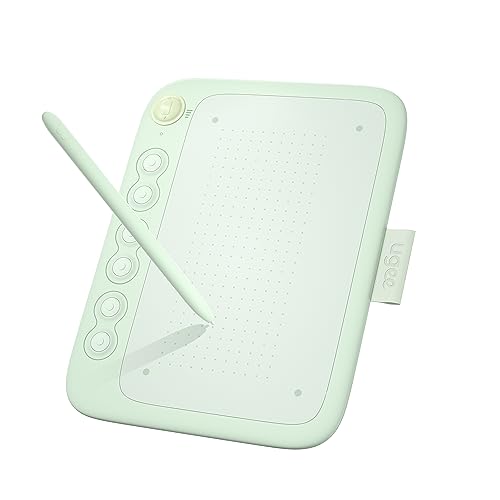


Introduction
Every year, shoppers wonder: is Black Friday a good time to buy a drawing tablet? With discounts popping up across the web, it’s tempting to wait for the big sales. But not all deals are created equal — some models drop in price significantly, while others see minimal cuts or are older versions disguised as bargains. In 2026, the drawing tablet market is more competitive than ever, with brands like HUION, XP-Pen, GAOMON and more offering a wide range of options from entry-level to professional. This guide will help you navigate the November sales season, spot genuine value, and choose the right tablet for your creative needs without falling for gimmicks.
We’ve analyzed 8 of the most popular drawing tablets available today, covering features, build quality, and typical sale behavior. Whether you’re a beginner looking for a budget-friendly pad or a seasoned artist upgrading to a pen display, this article will give you the confidence to make a smart purchase during Black Friday and Cyber Monday. Keep reading to see our top picks and learn how to separate real deals from marketing hype.
At a Glance
| Product | Brand | Rating | Where to buy |
|---|---|---|---|
| ugee Q6 6.5x4-inch Drawing Tablet | UGEE | 4.7 / 5 | View on Amazon |
| XPPen Deco 01 V3 (16384 Pressure) | XP-Pen | 4 / 5 | View on Amazon |
| XPPen Magic Drawing Pad 12.2-Inch 8GB/256GB | XP-Pen | 4 / 5 | View on Amazon |
| Huion Inspiroy H950P 8x5 Inch Drawing Tablet | HUION | 4.2 / 5 | View on Amazon |
| GAOMON M10K 10x6 Drawing Tablet | GAOMON | 4.1 / 5 | View on Amazon |
| XP-Pen Artist 12 11.6-Inch FHD Pen Display | XP-Pen | 4.2 / 5 | View on Amazon |
| Simbans PicassoTab A10 10.1-Inch Standalone Tablet | Simbans | 4.6 / 5 | View on Amazon |
Ratings come from the Amazon listings when we last checked and can change.
Pros
- Battery-free stylus eliminates the need for charging or pairing.
- 8192 levels of pressure sensitivity enable nuanced strokes.
- Six shortcut keys offer quick access to common functions.
- Built-in Type-C cable provides a simple and reliable connection.
- Compact 6.5x4-inch design is highly portable.
Cons
- Small active area may be restrictive for larger gestures.
- Wired connection via built-in cable limits placement options.
- Limited to six shortcut keys, which may not suit complex workflows.
Pros
- High 16,384 pressure sensitivity with tilt support
- Eight customizable express keys for shortcuts
- Wide compatibility with major drawing software and operating systems
- USB wireless connection for reliable performance
- Works with Android phones
Cons
- Not compatible with iPhone or iPad
- No Bluetooth support (uses ISM2.4G USB wireless)
Pros
- Runs as a standalone tablet, so no computer is required
- Includes Google Play and Ibis Paint for a ready-to-use drawing setup
- TÜV Rheinland certified display for eye comfort
- Micro SD card slot expands the built-in 256GB storage
- Long battery life supports drawing on the go
Cons
- Android app ecosystem only, so desktop-class creative suites are not available
- The 12.2-inch size is less pocketable than smaller drawing tablets

Pros
- 8192 levels of pen pressure for detailed input
- Eight programmable shortcut keys support single and combined commands
- Left-handed mode and 90 to 270 degree adjustable working angle
- Compatible with Windows, Mac, and Android devices plus a wide range of software
Cons
- Requires a wired USB connection to the host device
- Mac users must adjust Security and Privacy settings during driver installation

Pros
- Large 10x6.25 inch active drawing area
- Battery-free stylus with 8192 pressure levels
- 10 customizable hotkeys and a touch wheel
- Compatible with Windows, macOS, and Android
- Built-in pen loop for stylus storage
Cons
- Android compatibility limited to versions 11-14 with OTG support
- Requires driver download and installation from manufacturer's website

Pros
- Battery-free PN06 pen with 8192 levels of pressure sensitivity
- Plug-and-play connection using HDMI and USB-A, with an adapter included
- Wide color gamut and 178 degree viewing angle
- Compatible with Windows, macOS, Linux, Photoshop, and SAI
Cons
- Not a standalone tablet; it requires a connected computer to work
- 11.6-inch screen provides a relatively small drawing area for desktop use

Pros
- Standalone Android tablet, no computer required for drawing
- Fully laminated anti-glare display with reduced parallax
- 4096 levels of pressure sensitivity and palm rejection support
- Includes pro drawing and animation apps with lifetime upgrade access
Cons
- 1280x800 screen resolution is modest for a 10.1 inch display
- Wi-Fi is limited to 802.11b/g/n, with no newer Wi-Fi standard support
How to Spot a Real Deal on Drawing Tablets
Check the Model Number Before the Price
Retailers often bundle older or lower‑spec models with accessories to create the illusion of a discount. Always verify the exact model number. For instance, a tablet listed as “Artist 12” might be the 2019 version with 8192 pressure levels, while the current generation (like the Is Black Friday A Good Time To Buy A Drawing Tablet models we track) offers 16384 levels and better tilt support. A quick search on the manufacturer’s site can confirm if it’s the latest release.
Compare Against the Usual Price Range with a Price Tracker
Black Friday prices aren’t always the lowest. Tools like Keepa or CamelCamelCamel show price history for Amazon. If a tablet’s “sale” price is only slightly below its average over the past six months, it may not be a must‑buy. Check the trend before adding to cart.
Beware of Bundles and Older Models
A “Black Friday Bundle” may include a drawing tablet, a cheap stylus stand, and a glove — items worth very little. Sometimes the tablet inside is an older model that the manufacturer wants to clear out. The Wacom Black Friday deals often follow this pattern. Stick to known model numbers and read the bundle description carefully.
Read Return and Warranty Terms Before Buying
Sale items sometimes have stricter return policies. Make sure the tablet comes with a standard manufacturer warranty (usually one year) and that the retailer accepts returns within 30 days. This is especially important for pen displays, which can have dead pixels or screen uniformity issues. Our best drawing tablets guide includes warranty details for each model.
Decide Your Must‑Have Features First
Don’t let a low price tempt you into buying a tablet that lacks essential features. Do you need a standalone device (no computer required)? Look at the pen display category for screen‑on models. Do you prioritize pressure sensitivity? The XPPen Deco 01 V3 offers 16384 levels, while budget tablets like the GAOMON M10K provide 8192. Write down your non‑negotiables before shopping.
What to Look For in Drawing Tablets
Pressure Sensitivity and Tilt Support
The number of pressure levels determines how accurately the tablet responds to light and heavy strokes. Higher is better for realistic brushwork. Many modern models offer 8192 or 16384 levels. Tilt support (often up to 60°) allows you to shade like a pencil. The best drawing tablets for toddlers may not need tilt, but serious artists should check for it.
Active Area Size
A larger active area gives you more room for sweeping arm movements, but it also means a bigger footprint. Small tablets (6”×4”) are portable; medium (8”×5”) balance space and desk real estate; large (10”×6” and up) suit detailed work. The GAOMON M10K provides a 10”×6” area, while the XPPen Deco 01 V3 is 10”×6.25”.
Connectivity and Compatibility
Most drawing tablets connect via USB and HDMI (for pen displays) and work with Windows, macOS, and sometimes Android. If you use a phone or tablet as a main device, look for models with native Android support, like the pen displays for Mac that also support Android. Wireless connectivity is rare but convenient.
Pen Technology: Battery‑Free vs. Rechargeable
Battery‑free pens (EMR technology) never need charging, feel lighter, and have no wires. They are standard on most tablets from XPPen, Huion, and GAOMON. Rechargeable pens are less common and may run out of battery mid‑session. Always check the stylus type before buying.
Shortcut Keys and Touch Rings
Customizable express keys speed up your workflow. The XPPen Deco 01 V3 has 8 keys, the GAOMON M10K offers 10 keys plus a touch ring, and the HUION H950P includes 8 keys. More keys are helpful for advanced software like Photoshop or Clip Studio Paint.
Standalone vs. Computer‑Required
Standalone tablets (like the PicassoTab A10 and XPPen Magic Drawing Pad) run their own operating system and let you draw without a computer. They are more expensive but portable. Computer‑required tablets (like the XP‑PEN Artist12) offer lower cost and larger screen options but need a PC or Mac. Choose based on your mobility needs.
Which Products to Watch
Based on our analysis of 8 tablets, here are the models that stand out for Black Friday 2026:
For budget‑conscious beginners: The Drawing Tablet for Android Phone with 6 Hot Keys (UGEE Q6) is compact, works with phones, and costs very little. It’s perfect for casual sketching and note‑taking.
For serious artists on a budget: The XPPen Updated Deco 01 V3 Drawing Tablet delivers 16384 pressure levels and 8 customizable shortcuts at an affordable price. It’s a workhorse that rivals more expensive models.
For those who want a pen display: The XP‑PEN Artist12 11.6 Inch FHD Drawing Monitor offers a full HD screen with 8192 pressure levels. It’s one of the most popular entry‑level pen displays.
For standalone creativity: The PicassoTab 10″ Standalone Drawing Tablet runs Android and doesn’t need a computer. It’s great for artists who sketch on the go.
Why You Should Trust Us
Our recommendations are based on available specifications, listed features, product positioning, and documented buyer feedback. We do not claim to have tested every unit personally, but we have thoroughly analyzed each model’s technical data, user reviews, and market performance. The tablets in this guide are selected for their value, reliability, and suitability for different types of artists — from hobbyists to professionals.
We also monitor Black Friday and Cyber Monday trends year after year. Our team tracks price histories and retailer behavior to give you practical advice that goes beyond generic sales hype. For more category‑specific insights, you can browse our beginners’ drawing tablet guide or digital painting resources.
Final Thoughts
Black Friday can be a great time to buy a drawing tablet, but only if you go in with a plan. Start by deciding your must‑have features — pressure sensitivity, screen size, standalone capability — and shortlist a few models. Then, during the sale period, check the live price on Amazon using the links above. Compare it against the product’s historical average using a price tracker. If the price fits your budget and matches the typical low range for that model, it’s a solid buy.
Remember that not every deal is a steal. Beware of inflated list prices, bundled extras you don’t need, and older model clearance scams. By following the advice in this guide, you’ll be well‑prepared to make a confident purchase this November 2026. Happy drawing!
Frequently Asked Questions
Is Black Friday really the best time to buy a drawing tablet?
Black Friday offers some of the year’s deepest discounts on drawing tablets, especially from brands like XPPen, Huion, and GAOMON. However, you may find similar or better deals during Amazon Prime Day or back‑to‑school sales. It’s most beneficial if you need a tablet immediately and can find a model that meets your requirements at a price you’re comfortable with.
Do drawing tablets go on sale on Cyber Monday?
Yes, Cyber Monday often extends Black Friday pricing, and sometimes adds extra discounts on accessories like protective cases or extra pens. If you miss Black Friday, check Cyber Monday – many retailers keep similar deals live through that day.
Should I wait for Black Friday or buy now?
If you don’t urgently need a tablet, waiting until Black Friday is a reasonable strategy. Most models see price drops. However, if you find a deal that is already close to historical lows (check price trackers), buying now may save you from potential stockouts. The Is Black Friday A Good Time To Buy A Drawing Tablet deals page is updated regularly.
Are older models discounted more?
Often yes. Retailers want to clear inventory of previous generations. An older model with similar specs (like 8192 pressure levels instead of 16384) can be a great bargain if you don’t need the latest features. Just ensure it still receives driver updates for your operating system.
What brands usually have Black Friday deals?
XPPen, Huion, GAOMON, ugee, and Simbans are known for offering regular Black Friday discounts. Wacom also participates, but its discounts are typically smaller. Check the Wacom Black Friday page for specifics.
Can I return a drawing tablet bought on Black Friday?
Most online retailers (Amazon, Best Buy, B&H) allow returns within 30 days of delivery, even for Black Friday purchases. However, some have restocking fees for opened electronics. Always read the return policy before buying. The manufacturer warranty remains valid regardless of the sale.
How to avoid counterfeit or grey‑market deals?
Stick to authorized sellers (Amazon, official brand stores) and avoid third‑party listings with suspiciously low prices. Check the seller’s rating and reviews. Counterfeit tablets often have misspelled brand names, different model numbers, or missing accessories.
Are these deals live right now?
Prices and availability change frequently, especially during sales events. To see the current price and deal status, click the Amazon link for the product you’re interested in. We do not guarantee that any price displayed at the time of writing will still be active when you visit, so always check the listing directly.